One frog-engineer-px02/ folder containing the two runtime files.
Download ZIP fallbackDownloadable Codex pet package. Version 1.0.0
Circuittoad Codex Pet Download
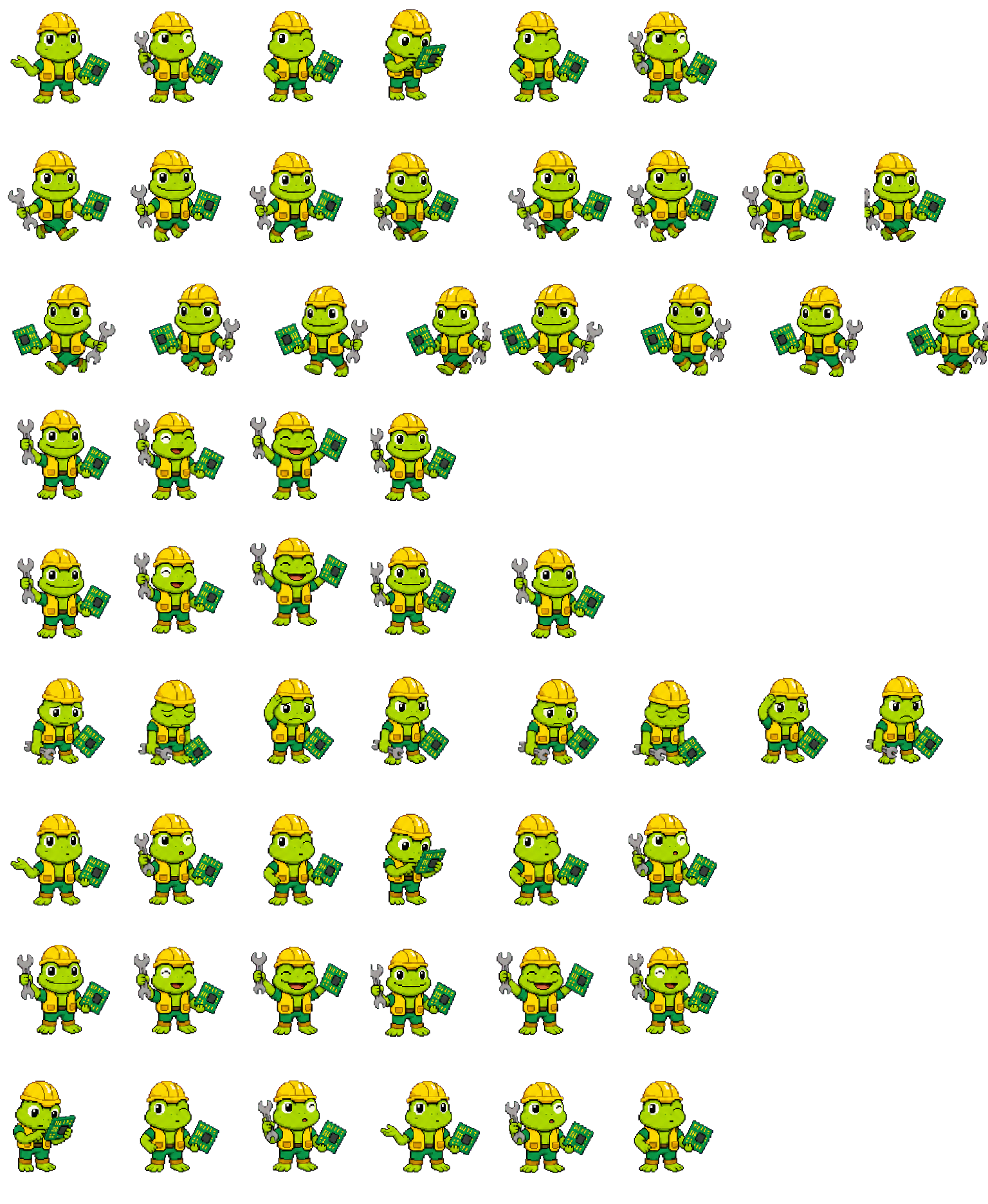
Install Circuittoad with one pinned npx command. The player below reads the exact nine-row spritesheet included in this package.
Install Circuittoad in one commandRequires Node.js 20+. The pinned installer verifies pet.json and spritesheet.webp, then stops instead of overwriting an existing pet folder.
npx --yes @codex-pets/cli@0.1.0 add frog-engineer-px02 Ready to install 9 animation rows Installer verifies SHA-256

Exact package preview
Preview the same frames Codex will load
Choose an activity to play its mapped package row with the published per-frame timing. Reduced-motion mode holds on a still frame.
Running · 6 package frames
Activity: RunningRunning
Circuittoad uses the engineer tools in a focused, non-directional work loop.
Release atlas SHA-256: 7eff24e3adb0…Fixed atlas · 9 rows · 57 used frames
Download filesAll nine package rows are populated
These strips are cropped from the downloadable spritesheet itself. The rows are adapted from the approved 16-pose source atlas, and every row retains at least three distinct articulated poses after whole-cell movement is ignored.
Idle
6 frames · row 0Run right
8 frames · row 1Run left
8 frames · row 2Waving
4 frames · row 3Jumping
5 frames · row 4Failed
8 frames · row 5Waiting
6 frames · row 6Running
6 frames · row 7Review
6 frames · row 8
Manual files and verification
ChecksumsDownload files for a manual install
Use these versioned files when the one-line installer is unavailable. The preview, direct WebP, and ZIP share one spritesheet SHA-256.
ID, display name, description, and spritesheet path for Circuittoad.
Download pet.json633.7 KiB lossless transparent WebP; 8×9 cells and 57 used frames.
Download WebP- Version
- v1.0.0 · released 2026-07-26
- License
- Codex Pets Personal Use License 1.0 — site-owner terms; no legal review claimed
- Verification
- Structural package validation passed 2026-07-26; runtime smoke test not claimed
- ZIP SHA-256
c5b9b0e3260f0fda0051614c44cde4ec9b68489df57035f116229e9e524f7ea4
This immutable v1.0.0 release uses the legacy v1-compatible 8×9 atlas and four-field manifest. Structural validation passed on 2026-07-26; it is not presented as the current newly-hatched v2 format. Runtime selection still depends on the user's product, account, workspace, and terminal. See the official Pets documentation and package contract .
Manual setup fallback
Prefer the ZIP? Install it manually
Use this fallback when npx is unavailable. ChatGPT Web can use the direct spritesheet when Upload pet is available for the account and workspace.
Show manual ZIP and Web instructionsDownload first, then copy the matching script or upload steps.
Two runtime files
The versioned download contains one pet-ID folder with only pet.json and spritesheet.webp.
pet_root="${CODEX_HOME:-$HOME/.codex}/pets"
archive="$HOME/Downloads/frog-engineer-px02-v1.0.0.zip"
pet_target="$pet_root/frog-engineer-px02"
expected_sha="c5b9b0e3260f0fda0051614c44cde4ec9b68489df57035f116229e9e524f7ea4"
[ -f "$archive" ] || { echo "Archive not found: $archive"; exit 1; }
[ ! -e "$pet_target" ] || { echo "Stop: $pet_target already exists. Back it up first."; exit 1; }
if command -v sha256sum >/dev/null 2>&1; then
  echo "$expected_sha  $archive" | sha256sum -c -
else
  echo "$expected_sha  $archive" | shasum -a 256 -c -
fi
temp_root="$(mktemp -d)"
trap 'rm -rf "$temp_root"' EXIT
unzip -q "$archive" -d "$temp_root"
test -f "$temp_root/frog-engineer-px02/pet.json"
test -f "$temp_root/frog-engineer-px02/spritesheet.webp"
mkdir -p "$pet_root"
mv "$temp_root/frog-engineer-px02" "$pet_target"Install, refresh, select
Use the pet without overwriting another install
The pinned installer verifies both files and stops if a different target folder exists. Manual files remain available as a fallback.
- 01Copy the one-line command
Use the command at the top of this page. Its npm package version and pet ID are pinned.
- 02Run the verified installer
The installer downloads pet.json and spritesheet.webp, checks their exact sizes and SHA-256 values, then writes both files together.
- 03Refresh and select
In Desktop, open Settings > Pets > Refresh. In Codex CLI, use /pets or /pets frog-engineer-px02.
- 04Use the manual fallback if needed
Download the ZIP or WebP below, compare it with the SHA-256 record, and preserve any matching folder before replacing it.
More downloadable pets
All pets